A SaaS UI/UX design agency for dashboards, onboarding and data-heavy products
We are a SaaS UI/UX design agency that also builds and runs SaaS products of our own. We design the screens your users live in every day: onboarding, dashboards, tables, settings and permissions, specified so engineers can build them without guessing.
- Free product UX review call
- Custom quotation, never a fixed package

- Onboarding
- Dashboards
- Roles and permissions
Worked with





Problems we solve
A capable product that feels hard to use?
SaaS products rarely fail because a feature is missing. They struggle because users can't find, understand or trust the features already there.
- 01
New users stall after sign-up
Trials start, but people never reach the moment where the product proves its worth.
- 02
Dashboards full of numbers, short on answers
Every metric is on screen, yet users still export to a spreadsheet to decide anything.
- 03
Each feature looks different
Years of releases left five table styles, three filter patterns and inconsistent buttons.
- 04
Designs that don't survive development
Mock-ups skip loading, empty and error states, so engineers fill the gaps on their own.
Our solution
SaaS product design from a team that ships SaaS
We design Social Sphere CRM, ZeroVault and Classify-X, then build and support them. That shapes how we design yours.
Designed around real tasks
We start from the jobs users come to do each day, not from a list of screens.
Every state specified
Loading, empty, error, partial and permission-limited states are designed, not left to chance.
Ready for code
Components, tokens and specs that map to how React products are actually built.
What's included
What our SaaS dashboard design covers
Each project is scoped to your product. These are the areas most include.
Not sure where to start?
We'll help you pick what to build first and phase the rest.
Onboarding and activation
Sign-up, workspace set-up, invitations and the first useful action, designed so a new user reaches value quickly and knows what to do next.
- Sign-up and sign-in flows
- Workspace set-up
- Team invitations
- Checklists and guided first steps
- Sample data where it helps
- Trial and upgrade prompts
Data-dense dashboards
Dashboards that answer the questions each role actually asks, with a clear hierarchy, sensible defaults and charts chosen for the decision rather than for decoration.
- Role-based home screens
- KPI and summary cards
- Chart selection
- Date ranges and comparisons
- Drill-down paths
- Export and sharing
Tables, filters and search
Most B2B work happens in tables. We design sorting, filtering, bulk actions, saved views and search so large datasets stay workable on every screen size.
- Column and density controls
- Filters and saved views
- Bulk actions
- Inline editing
- Global search
- Pagination and long lists
Roles, permissions and multi-tenant UI
Organisations, workspaces, members and roles designed so admins can control access confidently and every user sees only what they should.
- Organisation and workspace switching
- Member management
- Role and permission screens
- Client and guest access
- Audit history views
- Billing and plan settings
Empty, loading and error states
The moments most designs forget: a first visit with no data, a slow query, a failed upload, a limit reached. Each gets a clear message and a next step.
- First-run empty states
- Skeleton loading
- Error and retry messages
- Plan limit messages
- Offline and slow network states
- Notifications and toasts
Design-to-code handoff
Components, tokens and annotated specs in Figma, matched to a React component library, with our engineers reviewing feasibility before handoff.
- Component library
- Design tokens
- Annotated specs
- Interaction notes
- Accessibility checks
- Build review with engineers
What you get
What changes after a SaaS design project
A product that is easier to learn, use daily and keep building on.
Faster first value
Onboarding that leads to real use.
Useful dashboards
Screens that answer each role's questions.
Consistent patterns
One way to do tables, filters and forms.
Clear access control
Roles and permissions users understand.
Buildable specs
Designs engineers can ship without guessing.
Yours to keep
Figma files and components in your workspace.
Why us
Why SaaS teams choose Zero One Creation
We run our own SaaS
Social Sphere CRM, ZeroVault and Classify-X are designed, built and supported by us.
Designers beside engineers
Feasibility is checked while designing, not discovered during the build.
Multi-tenant experience
Workspaces, roles and audit trails are problems we solve in our own products.
Clear written scope
A proposal with scope, phases and a customised quotation.
Give us access to your product. We'll walk through it as a new user and show you where people are likely to get stuck.
A free product UX review call, then a written proposal with a customised quotation.
Our approach
How we design SaaS products and dashboards
Open each step to see what it covers.
01.UX audit
A walkthrough of the product as each role, with analytics and support tickets reviewed.
02.Research
Short interviews with users and your customer-facing team about daily tasks.
03.Flows and structure
Navigation, key flows and wireframes for the screens that matter most.
04.UI and components
High-fidelity screens built from a component set, with every state designed.
05.Prototype and test
Clickable prototypes tested with users before engineering time is spent.
06.Handoff and build support
Specs and tokens handed to your engineers or ours, with design review during the build.
Common situations
Where SaaS design work usually starts
Most product design engagements begin with one of these.
An MVP that grew without a designer
- What you notice
- The product works, but screens were added by whoever built each feature.
- How we fix it
- A UX audit, a shared component set and a phased clean-up of the busiest screens.
Trial users drop off early
- What you notice
- Sign-ups arrive, but few invite their team or complete set-up.
- How we fix it
- An onboarding redesign around the first valuable action, with prompts that guide rather than nag.
Enterprise customers ask for controls
- What you notice
- Larger clients want roles, audit history and admin settings the product doesn't have.
- How we fix it
- Designed role, permission and audit screens that fit the existing product.
Support tickets about the same screens
- What you notice
- The team answers the same how-do-I questions every week.
- How we fix it
- Clearer labels, better empty states and in-context help on the screens causing confusion.
Tools
Design and build tools
The tools behind our own products, chosen per project.
- Design
- FigmaFigJamVariables and tokensAuto layout
- Prototyping
- Figma prototypesCoded prototypesUser testing
- Front end
- ReactNext.jsTypeScriptTailwind CSS
- Components
- Radix primitivesshadcn/uiTanStack Table
- Product data
- Product analyticsSession recordingsSupport tickets
Options
Product-led SaaS design, a UI kit, or design by the dev team?
Three common ways SaaS teams get their screens designed.
| Criteria | Product-led SaaS design | Off-the-shelf UI kit | Designed by developers |
|---|---|---|---|
| Starting point | User tasks and roles | Ready-made screens | The feature being built |
| Fit to your product | Designed for it | Generic | Varies by feature |
| States and edge cases | All specified | Some included | Handled as found |
| Consistency over time | Shared components and tokens | Until you outgrow the kit | Drifts with each release |
| Best for | Products with paying users and growing scope | Early prototypes and internal tools | Very small products with one developer |
A good UI kit is often the right foundation. We frequently build on one and design what it doesn't cover.
What we design
B2B UX design across product types
Different products, different daily tasks.
SaaS platforms
Multi-tenant products with trials and plans.
See the workCRM products
Pipelines, contacts, tasks and approvals.
See the workERP and operations
Inventory, orders and production dashboards.
See the workLearning platforms
Admin, teacher and student dashboards.
See the workB2B portals
Dealer, distributor and customer portals.
See the workInternal tools
Admin panels and team dashboards.
See the work
How we work together
Three ways to work with us
Every engagement starts with a written proposal and a customised quotation.
Product UX audit
A review of your product with prioritised fixes and quick wins.
Best for: Teams unsure where to start
Design project
Research, flows, UI and handoff for a defined area of the product.
Best for: Onboarding, dashboards or a redesign
Ongoing product design
A designer working with your product team release by release.
Best for: SaaS products shipping every month
Our product
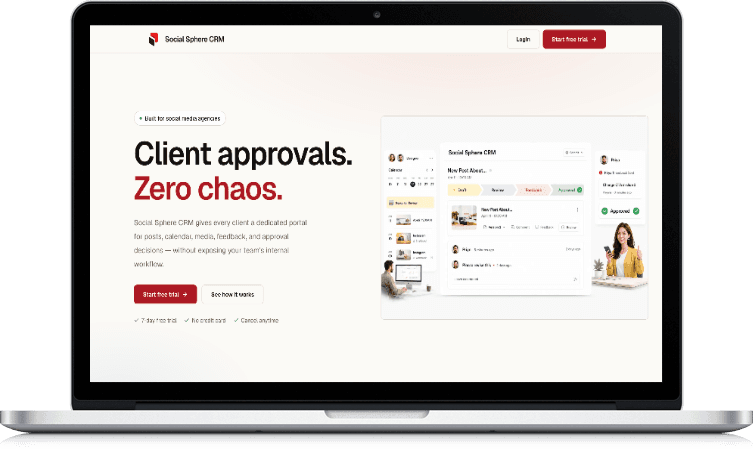
Social Sphere CRM: client approvals without the chaos
- Client portals
- A dedicated portal for each client
- Approvals
- Approve, reject or request changes
- Audit trail
- Who approved what, and when
- Calendars
- Content plans with live status
Guide
SaaS dashboard design: a practical guide
What makes SaaS design different
A marketing website is visited occasionally. A SaaS product is used for hours, often every day, by people with different roles and permissions. Small frictions repeat hundreds of times a week.
That shifts the priorities: speed of common tasks, consistency, clear states and respect for expert users matter more than visual novelty.
Design onboarding around first value
Identify the first action that shows a new user why the product is worth keeping: sending the first post for approval, uploading the first file, enrolling the first student. Design sign-up and set-up to reach that action with as few steps as possible.
Defer anything that can wait, such as profile details and advanced settings. Checklists help when set-up genuinely has several steps; long product tours rarely do.
Dashboards should answer questions
Start each dashboard by writing the questions its users ask: what needs my attention today, are we on track this month, which clients are waiting on us. Then choose the smallest set of numbers and charts that answer them.
Use comparison to give numbers meaning, such as against last period or target. Put actions next to the data, so seeing a problem and fixing it happen on the same screen.
Choosing the right chart
Line charts show change over time. Bar charts compare categories. A single number with a comparison is often clearer than any chart. Pie charts and gauges rarely help once there are more than a few segments.
Label axes plainly, keep colours meaningful and consistent, and make sure charts still read for colour-blind users and in dark mode.
Tables are where B2B work happens
Most B2B users spend their day in lists: leads, orders, files, students, tickets. Good tables offer sorting, filtering, adjustable density, bulk actions and saved views, and keep the most important columns visible on smaller screens.
Keep filter state in the URL so a filtered view can be bookmarked and shared with a colleague. It is a small decision that saves a lot of repeated clicking.
Designing roles and permissions
Multi-tenant products need clear answers to who can see and do what. Model organisations, workspaces and roles in a way admins can understand, and show permission limits in the interface rather than hiding buttons without explanation.
For products used with clients or guests, design their view separately. A client approving a post needs a far simpler screen than the agency team managing it.
Empty, loading and error states
Every list has an empty state, every query can be slow and every upload can fail. Designing these states explains the product to new users and keeps experienced users calm when something goes wrong.
A good empty state says what will appear here and offers the action that fills it. A good error says what happened and what the user can do next.
Accessibility in data-heavy interfaces
Dashboards and tables need keyboard navigation, visible focus, sufficient contrast, readable type at dense sizes and charts that don't rely on colour alone.
Accessible patterns also help power users, who often prefer the keyboard for repetitive work.
Handing design to engineers
Handoff works best when design is built from the same components engineers use. Tokens for colour, spacing and type, documented component states and notes on interactions remove most of the guesswork.
Involve an engineer during design, not only at the end. Many expensive build problems are cheap to fix in a wireframe.
Redesigning without upsetting existing users
Users who rely on your product every day notice every change. Redesign in phases, keep familiar patterns where they work, and explain changes inside the product when they ship.
Where possible, release changes to a small group first and watch support tickets and usage before rolling out to everyone.
What affects the cost of SaaS design
Costs depend on the number of flows and screens, the number of user roles, research depth, whether a component library exists, prototyping and testing, and how much build support is needed.
We don't publish fixed prices or packages. After a product review call, we send a written proposal with a customised quotation.
Before you talk to us
Frequently asked questions
What does a SaaS UI/UX design agency do?
Do you offer dashboard design services on their own?
Have you designed SaaS products before?
Can you also build what you design?
What is included in a UX audit of our product?
Do you work in Figma?
Can you work with our existing design system or UI kit?
Do you design for mobile as well as desktop?
How do you handle roles and permissions in design?
Do you test designs with real users?
Will a redesign confuse our existing users?
How much does SaaS dashboard design cost?
Explore related services
All services- ServiceUI/UX designResearch-led product design.
- ServiceSaaS developmentMulti-tenant products, built.
- ServiceDesign systemsComponents and tokens that scale.
- ServiceMobile app designiOS and Android app design.
- ServiceWeb application developmentPortals, dashboards and tools.
- GuideSaaS onboarding that reduces drop-offGuide: designing first-run flows.
Contact us
Show us your product. We'll review the experience with you.
Share your product, who uses it and where you think people struggle. Our team reviews every enquiry and gets back to you to set up a call.
- +91 95683 56730
- Chat on WhatsApp
- contact@zeroonecreation.com
- 3rd Floor, 113 Double Phatak, Meerut Road, Roorkee, Uttarakhand 247667
- Monday – Saturday, 9 AM – 5 PM