Dynamic QR codes
ZOC Link, dynamic QR codes you can edit after printing
ZOC Link creates QR codes that point to a link you control. Change the destination whenever you need to, even after the code is on packaging, posters or menus, and see scans as they happen.
- Edit the destination after printing
- Real-time scan analytics
- Download as PNG or SVG
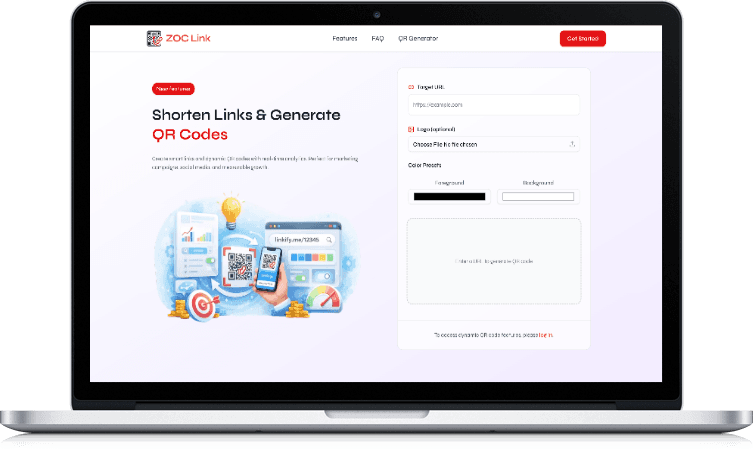
- Category
- Dynamic QR codes and short links
- Built for
- Print, packaging and event campaigns
- Downloads
- PNG and SVG
- Website
- zoclink.com
The problem
A printed QR code is hard to take back
A normal QR code stores its destination inside the pattern. Once it is printed, the link is fixed for as long as the paper exists.
- 01
One wrong link, thousands of copies
A typo in the URL or a page that moves means reprinting every box, flyer or standee that carries the code.
- 02
Campaigns change, print does not
The offer ends, the menu changes, the event moves. The code on the wall still points to last month's page.
- 03
No idea whether anyone scanned
A static code gives no feedback. You cannot tell which poster, pack or location is actually being used.
- 04
Codes that don't look like your brand
Plain black squares sit awkwardly on designed packaging and signage.
Features
QR codes and links you stay in control of
ZOC Link puts a short link between the printed code and the page it opens. That one step makes the code editable and measurable.
Dynamic QR codes
Each code points to a short link, and the short link points wherever you choose.
- Change the destination at any time
- The printed code stays the same
- Fix mistakes without reprinting
Scan analytics
See scans in real time and learn which codes are being used.
- Real-time scan tracking
- Compare codes across placements
- Spot codes nobody is scanning
Branded codes
Make the code fit the design it sits on.
- Add your logo
- Choose foreground and background colours
- Preview before you download
Print-ready downloads
Export codes in the format your designer or printer needs.
- PNG for screens and quick use
- SVG for sharp print at any size
Short links
Shorten long URLs for campaigns, social posts and messages.
- Clean links that are easy to share
- Use the same link behind a QR code
Bio pages
One page for your work, links and contact details, behind your name.
- Put every link in one place
- Share it as a link or a QR code
How it works
Create once, print once, update whenever you need
The printed code never changes. Everything after the scan does.
- 01.
Enter the destination
Paste the page you want people to open: a menu, an offer, a form or a product page.
- 02.
Style the code
Add your logo and pick colours so the code matches your packaging or signage.
- 03.
Download and print
Export as PNG or SVG and send it to print with the rest of your artwork.
- 04.
Watch the scans
Follow scans in real time to see which placements people actually use.
- 05.
Change the destination later
When the campaign changes, update the link. Every printed copy now opens the new page.
Who it's for
For anyone whose QR codes outlive their campaigns
ZOC Link is built for marketing teams and businesses running print or event campaigns, where reprinting is slow and expensive.
Marketing teams
Run print campaigns, posters and flyers with codes you can redirect and measure.
Restaurants and cafés
Point table and counter codes to a menu that changes with the season.
Packaging and product teams
Put one code on the pack and update what it opens without a new print run.
Event organisers
Use codes on badges, banners and stalls, and change the destination as the event runs.
Inside the product
A code that stays the same while the page behind it changes
On the left, a dynamic QR code whose destination was changed after printing, drawn with sample data. On the right, the ZOC Link website.

Built by Zero One Creation
A small product for a common, costly problem
ZOC Link is one of the products Zero One Creation designs, builds and runs. It exists for one problem: a QR code printed on packaging or signage that can't be corrected once it's live.
It is also the base for our NFC and QR solutions. Where a business needs more than a link, such as team-managed business cards, review stands or lead capture, we set it up on ZOC Link and build the custom pieces around it.
Want a custom version?
The same team that builds our products builds software for clients. These are the services closest to ZOC Link.
Need QR or NFC built into your own process?
From review stands to packaging codes to team business cards, we set up solutions on ZOC Link and build the custom software around them.
Questions about ZOC Link
Frequently asked questions
What is a dynamic QR code?
Can I change where a printed QR code points?
What does ZOC Link track?
Which file formats can I download?
Can I add my logo and brand colours?
Does ZOC Link support NFC cards or review stands?
How much does ZOC Link cost?
Related products, tools and services
All products- ProductSmart NFC & QR solutionsNFC cards, review stands and smart packaging on ZOC Link.
- Free toolFree QR code generatorCreate a QR code in your browser.
- IndustryChannel loyalty softwareQR scan-to-earn programmes for manufacturers.
- ServiceLocal SEOGoogle Business Profile, reviews and local search.
- ServiceSaaS developmentBuild your own product on a proven SaaS foundation.
- ProductZeroVaultTeam file storage with visible permissions.