AWS consulting services in India for teams that need their cloud to just work
Our AWS consulting services in India cover the whole account: architecture, deployments, serverless functions, storage, databases, monitoring and the monthly bill. We set it up the way we run our own products, in accounts that stay in your name.
- Free AWS review call
- Custom quotation, never a fixed package

- Architecture
- Serverless
- Cost reviews
Worked with





Problems we solve
Is your AWS account a mystery to the people paying for it?
Many AWS accounts start with one developer and a free-tier server. A few years later, nobody is sure what runs where or why the bill keeps rising.
- 01
A bill nobody can explain
Costs rise every quarter, and old servers, snapshots and data transfer charges hide in the invoice.
- 02
Everything on one server
The website, API, database and file uploads share one machine, so one problem takes everything down.
- 03
Access that was never cleaned up
Former developers still have keys, the root account is used day to day and nothing is logged.
- 04
Releases done by hand
Someone logs in to the server to deploy, and a bad release means a late night rolling back.
Our solution
AWS architecture sized for your product, not for a slide deck
We pick the simplest set of AWS services that will carry your traffic, keep your data safe and stay affordable, then automate how it is run.
Plain architecture first
Managed services where they save effort, servers or containers where they cost less, and serverless where the workload is spiky.
Built to be handed over
Infrastructure written as code, documented and kept in your own AWS account, so any competent team can run it.
Costs watched from day one
Budgets, alerts and tags are part of the set-up, so the bill is reviewed as a habit, not a surprise.
AWS services
What our AWS development services cover
Pick one area to fix, or let us look after the whole account.
Not sure where to start?
We'll help you pick what to build first and phase the rest.
AWS architecture and account set-up
A sound AWS architecture starts with the account itself: separate environments, sensible networking, least-privilege access and logging, before a single application is deployed.
- Multi-account structure
- VPC and network design
- IAM roles and least privilege
- Root account lock-down
- CloudTrail logging
- Architecture diagrams
Deployment and CI/CD
Applications packaged with Docker and deployed through pipelines with tests, staging and an approval step, so releases are routine and easy to roll back.
- GitHub Actions pipelines
- Docker images
- ECS on Fargate or EC2
- Staging environments
- Blue-green or rolling releases
- One-click rollback
Serverless on Lambda
Event-driven functions for background jobs, webhooks, file processing and APIs with uneven traffic, so you pay for work done rather than idle servers.
- AWS Lambda functions
- API Gateway
- SQS queues
- EventBridge schedules
- Step Functions workflows
- Cold-start tuning
S3 storage and CloudFront delivery
File uploads, media libraries and static websites stored in S3 and served through CloudFront, with private buckets, signed URLs and lifecycle rules.
- Private S3 buckets
- Presigned uploads
- CloudFront distributions
- Custom domains and TLS
- Lifecycle and archive rules
- Static site hosting
Databases on RDS
PostgreSQL or MySQL on Amazon RDS with automated backups, encryption, sensible instance sizes and read replicas where reporting load needs them.
- RDS PostgreSQL and MySQL
- Automated backups
- Point-in-time recovery
- Multi-AZ where needed
- Read replicas
- ElastiCache for Redis
Monitoring and AWS cost optimization
Dashboards, alerts and logs that show why something broke, plus regular cost reviews that find idle resources, oversized instances and storage that should be archived.
- CloudWatch dashboards
- Alarms and log search
- Uptime checks
- Cost Explorer reviews
- Budgets and tagging
- Savings Plans advice
What you get
What changes in your AWS account
An account you understand, can afford and can hand to someone else.
A bill you can read
Costs tagged by product and environment.
Steady under load
Scaling and caching for busy days.
Tighter access
Named users, roles and no shared keys.
Routine releases
Pipelines with tests and rollback.
Problems seen early
Alerts that fire before customers call.
Your account, your name
Nothing locked in with us.
Why us
Why teams trust their AWS to Zero One Creation
We run our own products on AWS
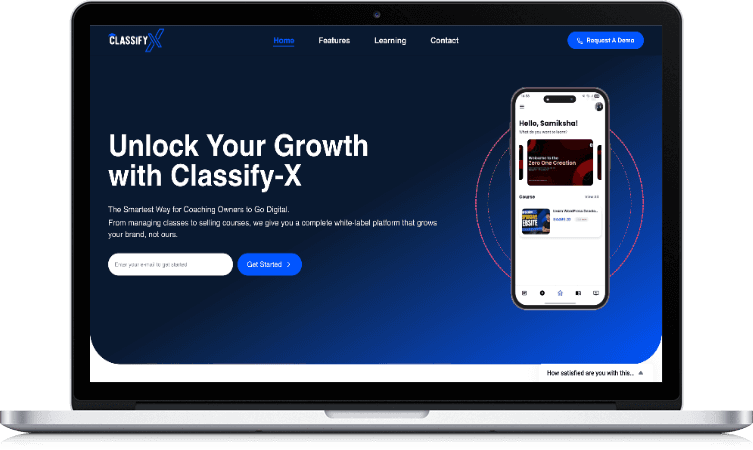
Classify-X, our white-label LMS, runs on AWS, so we look after production systems, not just diagrams.
Developers who do infrastructure
The people who write your application also design where it runs, so the two fit together.
Independent, no reselling
We work with AWS but don't resell it. Your account and billing stay directly with AWS.
Clear written scope
A proposal with scope and a customised quotation before work starts.
Send us a screenshot of last month's AWS bill, and we'll tell you where we'd look first.
A free review call, then a written proposal with a customised quotation.
Our approach
How we take on an AWS account
Open each step to see what it covers.
01.Read-only review
With read-only access, we list what is running, who can reach it, what it costs and how it is backed up.
02.Findings and plan
A short written report: risks, savings and architecture changes, ranked by effort and value.
03.Secure the basics
Root account locked, access reset, logging switched on and budgets set before bigger changes.
04.Rebuild as code
Infrastructure recreated in Terraform or AWS CDK, tested in staging, then promoted to production.
05.Automate releases
Pipelines, monitoring and alerts wired in so day-to-day running needs fewer manual steps.
06.Review and hand over
Regular cost and security reviews, with documentation your team or ours can work from.
Common situations
Where AWS work usually starts
Most AWS engagements begin with one of these.
The bill doubled and nobody knows why
- What you notice
- The monthly invoice grows faster than traffic, with charges for services nobody remembers creating.
- How we fix it
- A cost review by service and tag, idle resources removed, instances resized and budgets with alerts added.
The developer who set it up has left
- What you notice
- Passwords live in one person's notes, and nobody dares to change anything.
- How we fix it
- An account audit, access reset to named users and roles, and documentation of what runs where.
The site slows down at peak times
- What you notice
- Admissions, sales or campaign days bring the server to its knees.
- How we fix it
- Load balancing, auto scaling, caching and CloudFront in front of static files.
Backups exist on paper only
- What you notice
- Snapshots are scheduled but nobody has ever tried a restore.
- How we fix it
- Tested restores, point-in-time recovery for databases and a written recovery plan.
AWS services we use
The AWS toolkit we reach for most
We use what the product needs, and leave the rest of the catalogue alone.
- Compute
- EC2ECS and FargateAWS LambdaAuto Scaling
- Storage and delivery
- Amazon S3CloudFrontRoute 53Certificate Manager
- Data
- RDS PostgreSQLRDS MySQLDynamoDBElastiCache
- Integration
- API GatewaySQSSNSEventBridgeSES
- Delivery and code
- TerraformAWS CDKDockerGitHub Actions
- Security and operations
- IAMSecrets ManagerCloudWatchCloudTrailAWS Backup
Options
AWS, a managed platform or a single server?
How the common hosting choices compare for a growing product.
| Criteria | AWS, set up properly | Managed app platforms | One VPS or shared hosting |
|---|---|---|---|
| Control | Full control of network, data and access | Limited to the platform's options | Full, but all manual |
| Scaling | Automatic, within rules you set | Automatic for supported apps | Upgrade the server by hand |
| Running cost | Pay for what you use; needs reviewing | Simple, rises with usage | Low until it breaks |
| Effort to run | Moderate, lower with automation | Low | High and easy to neglect |
| Best for | Products with data, integrations and growth plans | Front ends and simple apps | Small brochure websites |
AWS isn't always the answer. If a managed platform or a simple server suits you better, we'll say so.
Who we help
AWS for different kinds of businesses
The same services, arranged differently for each kind of workload.
SaaS products
Multi-tenant apps with background jobs, file storage and steady releases.
See the workEducation platforms
Learning platforms with exam-day spikes and video.
See the workOnline stores
Catalogue images, order APIs and sale-day traffic.
See the workManufacturers
ERP, dealer portals and integrations hosted in one account.
See the workHealthcare businesses
Booking and patient apps with careful access control.
See the workStartups
An MVP set up cheaply with room to grow.
See the work
How we work together
Three ways to work with us on AWS
Every engagement starts with a written proposal and a customised quotation.
AWS review
A one-off audit of cost, security, backups and architecture, with a ranked list of fixes.
Best for: Accounts that grew without a plan
Build or rebuild
New infrastructure as code, pipelines and monitoring for a product launch or clean-up.
Best for: New products and major changes
Ongoing cloud support
Regular cost and security reviews, upgrades and changes as the product grows.
Best for: Teams without a DevOps hire
Case study
Classify-X: a white-label learning platform for coaching institutes
- Multi-tenant
- Isolated data for every institute
- White-label
- Each institute under its own brand
- Mobile-first
- Student experience built for phones
- Own payments
- Fees go straight to each institute
Guide
AWS for growing businesses: a practical guide
When AWS is the right choice
AWS suits products that hold important data, connect to other systems, run background work or need to grow without being rebuilt. It gives you control over where data lives and who can reach it.
It is not always the cheapest or simplest option. A small brochure website or a front end with no back end may be better on a managed platform, and we'll recommend that when it fits.
Choosing a region in India
AWS has two regions in India: Mumbai (ap-south-1) and Hyderabad (ap-south-2). Hosting close to your users lowers latency, and keeping data in India can help with customer contracts and data protection expectations.
Some newer services reach Indian regions later than others, so we check availability before designing around a service.
Account basics nobody should skip
Lock the root account with multi-factor authentication and stop using it day to day. Give each person their own sign-in, use roles instead of long-lived access keys and remove access the day someone leaves.
Separate production from staging, ideally in different AWS accounts under AWS Organizations, so a test mistake cannot touch live data. Switch on CloudTrail so every change is logged.
Servers, containers or serverless?
EC2 servers are familiar and predictable. Containers on ECS with Fargate remove server patching and make releases consistent. Lambda functions suit work that comes in bursts, such as webhooks, image processing and scheduled jobs.
Most products end up with a mix. The right AWS architecture follows the workload, not the trend, and the simplest option that meets the need usually wins.
S3 and CloudFront for files and static sites
Keep uploads and media out of your application server. Store them in private S3 buckets, let browsers upload directly with presigned URLs and serve them through CloudFront for speed.
Lifecycle rules move old files to cheaper storage classes automatically, which matters once you hold years of documents or images.
Running databases on RDS
Amazon RDS handles patching, automated backups and point-in-time recovery for PostgreSQL and MySQL. Multi-AZ keeps a standby copy in another data centre for products that cannot afford long outages.
Size the instance from real usage, not guesses, and add read replicas when reports start slowing down the main database.
Monitoring that tells you why
Uptime checks tell you a site is down. Useful monitoring also shows error rates, slow requests, queue lengths and database load, so you can see why.
Alerts should go to a person who can act, with thresholds tuned so the team doesn't learn to ignore them.
AWS cost optimization habits
Most savings come from simple habits: delete what isn't used, resize oversized instances, archive old data, schedule non-production environments to stop overnight and watch data transfer charges such as NAT gateways.
Tag resources by product and environment, set AWS Budgets with alerts and review Cost Explorer monthly. Savings Plans or reserved instances make sense once usage is steady.
Infrastructure as code
Infrastructure built by clicking in the console is hard to repeat and harder to review. Writing it in Terraform or AWS CDK means changes go through review, environments match and a lost resource can be recreated.
It also makes handover realistic: the next team reads the code instead of guessing.
Backups and disaster recovery
Decide how much data you could afford to lose and how long you could be offline, then design backups to match. AWS Backup can manage schedules and retention across services.
A backup only counts once a restore has been tested. We restore to a separate environment on a schedule and write down the steps.
What affects the cost of AWS consulting
Our effort depends on the size and state of your account, the number of applications and environments, how much is rebuilt as code, data migration needs and whether you want ongoing support. Your AWS usage is billed separately by AWS.
We don't publish fixed prices or packages. After a review call, we send a written proposal with a customised quotation.
Before you talk to us
Frequently asked questions
Are you an AWS partner?
Can you reduce our AWS bill?
Will the AWS account be in our name?
Can you take over an AWS set-up someone else built?
Which AWS region should we use?
Do you build serverless applications?
Do you use Kubernetes?
Can you set up CI/CD on AWS?
Do you write infrastructure as code?
Can you move our application from another host to AWS?
Do you offer ongoing AWS support?
How much do AWS consulting services cost?
Explore related services
All services- ServiceCloud & DevOpsInfrastructure, CI/CD and operations.
- ServiceCloud migrationMoving to AWS with a rollback plan.
- ServiceSaaS developmentMulti-tenant products built to scale.
- ServiceNode.js developmentAPIs and back ends that run well on AWS.
- GuideServerless explainedGuide: serverless in plain English.
- GuideMonitoring and alertingGuide: catching problems early.
Contact us
Tell us what runs in your AWS account today.
Share a few details about your product and set-up. An engineer reviews every enquiry and gets back to you to arrange a call.
- +91 95683 56730
- Chat on WhatsApp
- contact@zeroonecreation.com
- 3rd Floor, 113 Double Phatak, Meerut Road, Roorkee, Uttarakhand 247667
- Monday – Saturday, 9 AM – 5 PM