Custom CRM development company in India, built around how your team sells

We design and build CRM software that follows your sales process, not the other way round: leads from every channel in one place, follow-ups that don't slip, and reports your team trusts.

  • Free strategy call
  • Custom quotation, never a fixed package
crm/leads.ts
1// Your pipeline, your stages, your rules2export const leads = pgTable('leads', {3  id: uuid('id').primaryKey(),4  source: text('source'),   // website, WhatsApp, referral5  stage: stage('stage'),    // new → qualified → won6  ownerId: uuid('owner_id'),7  nextFollowUp: timestamp('next_follow_up'),8});910export async function assignLead(lead) {11  const owner = await pickOwner(lead.region);12  await notify(owner, 'New lead: ' + lead.name);13}
  • Your pipeline stages
  • Auto-assignment
  • Follow-up reminders
  • Role-based access

Worked with

Problems we solve

Are leads slipping through the cracks?

Most growing businesses don't lack leads. They lose them between WhatsApp chats, spreadsheets and inboxes, and nobody can see the full picture.

  1. 01

    Leads scattered everywhere

    Enquiries arrive by website, phone, WhatsApp, email and referrals, and end up in personal phones and spreadsheets.

  2. 02

    Follow-ups that never happen

    Without reminders and ownership, warm leads go cold and nobody notices until the deal is lost.

  3. 03

    A CRM that doesn't fit

    Off-the-shelf tools force your team into someone else's process, so they stop using it and go back to Excel.

  4. 04

    Reports nobody trusts

    Sales numbers are pieced together by hand every month, so decisions are made on guesses.

Our solution

A CRM that matches your process, so your team actually uses it

We start with how your business really sells, then build the CRM around it: your stages, your approvals, your reports, and the tools your team already uses.

  • A business problem, not a software purchase

    Lost leads and slow follow-ups cost revenue. We map where enquiries come from, who handles them and where they get stuck, before writing any code.

  • How we approach it

    We build the core pipeline first and put it in your team's hands early, then add automation, integrations and reports in short iterations based on real use.

  • Adoption is part of the project

    A CRM only works if people use it. We keep screens simple, train your team, and fix friction in the first weeks after launch.

CRM development services

What we build

Custom CRM software development covers more than a contact list. These are the CRM development services we offer, from a first sales pipeline to a system that runs your customer operations.

01

Custom CRM software development

A CRM designed from scratch around your sales and service process: your fields, your pipeline stages, your approval rules and your reports. It runs in the browser and on phones, and grows with you instead of charging per seat for features you never use.

  • Custom pipeline stages and fields
  • Contact and company records
  • Activity timeline for every lead
  • Tasks, reminders and follow-ups
  • Mobile-friendly for field teams
  • Your branding and your domain
02

Lead management and sales pipeline

Capture leads from every channel automatically, assign them to the right person, and track every deal through your stages. Managers see what is moving and what is stuck without asking for updates.

  • Website and landing page form capture
  • Rule-based lead assignment
  • Lead scoring and qualification
  • Duplicate detection
  • Kanban and list pipeline views
  • Win and loss reasons
03

CRM integrations

Connect the CRM to the tools your business already runs on, so data flows automatically instead of being copied by hand. We integrate with messaging, email, accounting, payment and ERP systems through their official APIs.

  • WhatsApp Business messaging
  • Email and calendar sync
  • Accounting and invoicing tools
  • Payment gateways
  • ERP and inventory systems
  • Telephony and call logging
04

Quotations, approvals and documents

Generate quotations and proposals from CRM data, route them for approval and track their status. Standard documents are created in seconds instead of being rebuilt in Word every time.

  • Quotation and proposal templates
  • Approval workflows
  • PDF generation
  • Version history
  • Discount and pricing rules
  • E-signature integration where needed
05

Customer portals

Give clients a secure portal to see their projects, documents, approvals and invoices, so your team answers fewer status questions. We build this kind of portal in our own product, Social Sphere CRM.

  • Client login per account
  • Approval and feedback flows
  • Document and file sharing
  • Status tracking
  • Notifications by email
  • Full audit trail
06

CRM migration and modernisation

Move from spreadsheets, an old CRM or an off-the-shelf tool you have outgrown. We clean and map your data, migrate it with checks at every step, and run the old and new systems side by side until your team is confident.

  • Data cleaning and de-duplication
  • Field and stage mapping
  • Migration from Excel or other CRMs
  • Parallel run before switch-over
  • Team training
  • Post-launch support
07

Reports, dashboards and automation

Turn CRM data into dashboards that answer real questions: where leads come from, which sources convert, how long deals take and who needs help. Routine work such as reminders, assignments and status updates runs automatically.

  • Sales and source dashboards
  • Team performance views
  • Scheduled email reports
  • Automated reminders and escalations
  • Data export
  • AI-assisted lead summaries, where useful

What you get

Outcomes, not just another tool

A CRM is only worth building if it changes how your team works every day. These are the outcomes we design for.

  • Every lead in one place

    Website, WhatsApp, phone and referral leads captured and assigned automatically.

  • Faster follow-ups

    Reminders, ownership and escalations so no enquiry waits on someone's memory.

  • Clear visibility

    Live dashboards instead of month-end spreadsheets stitched together by hand.

  • Fits your process

    Your stages, fields and approvals, so the team uses it instead of working around it.

  • Secure by role

    Each person sees what their role needs, with every change recorded.

  • Software you own

    Source code and data in your name, with no per-user licence to keep paying.

Why us

Why businesses choose Zero One Creation

  • We run our own CRM product

    Social Sphere CRM, with client portals and approval workflows, is designed, built and run by our team.

  • Custom, not configured

    We build around your process instead of bending your business to fit a template.

  • Clear written scope

    A proposal with scope, deliverables and a customised quotation before work starts.

  • One team, start to finish

    Design, development, integrations and support from one team in Roorkee.

Not sure what your CRM should do yet? Tell us how you sell today and we'll map it with you.

A free strategy call, then a written proposal with a customised quotation.

Our approach

How we build a CRM your team will use

Every CRM is different. The way we build one isn't. Open each step to see what it covers.

  1. 01.Process mapping

    We map how leads arrive, who handles them, the stages they pass through, the approvals involved and the reports you need.

  2. 02.Data model and workflow design

    Fields, stages, roles, automation rules and integrations, agreed in writing before design starts.

  3. 03.Core pipeline first

    The essential lead and deal flow is built and handed to your team early, so real use shapes everything after it.

  4. 04.Integrations and automation

    Website forms, WhatsApp, email, accounting or ERP connections, plus reminders, assignments and escalations.

  5. 05.Data migration and training

    Existing data is cleaned and moved with checks, and your team is trained on the workflows they will use every day.

  6. 06.Launch and improvement

    A supported launch, then improvements based on how the team actually uses the system in its first weeks and months.

Signs you need a custom CRM

Have you outgrown spreadsheets or your current CRM?

These are common signs that a business has outgrown its current tools, and what a custom CRM changes.

  • The team works around the CRM

    What you notice
    People keep their own spreadsheets or WhatsApp notes because the CRM doesn't match how they work.
    How we fix it
    A CRM built around your real stages and fields, with only the screens each role needs.
  • Per-user costs keep climbing

    What you notice
    Every new hire adds another licence, and you pay for modules nobody uses.
    How we fix it
    Software you own, with features chosen for your business rather than a pricing tier.
  • Data is copied between systems

    What you notice
    Leads are re-typed from forms, orders re-entered into accounting, and mistakes creep in.
    How we fix it
    Integrations that move data automatically between your website, CRM, accounting and ERP.
  • Approvals happen in chats

    What you notice
    Discounts, quotations and client sign-offs are approved over WhatsApp with no record.
    How we fix it
    Approval workflows with a full audit trail of who approved what and when.
  • Managers chase updates

    What you notice
    Sales reviews start with asking everyone where their deals stand.
    How we fix it
    Live dashboards by stage, source and owner, updated as the team works.
  • Customers ask for status

    What you notice
    Your team spends hours answering 'what's the status?' calls and messages.
    How we fix it
    A customer portal where clients see progress, documents and approvals themselves.

Technology

Our CRM tech stack

Proven, well-supported technology, chosen for your project and hosted in your name.

Front end
Next.jsReactTypeScriptTailwind CSS
Back end
Node.jsDjango RESTHonoREST and GraphQL APIs
Data
PostgreSQLMongoDBDrizzle ORM
Auth and security
Role-based accessBetter AuthAudit logsTwo-factor login
Hosting
AWSVercelDockerAutomated backups
Integrations
WhatsApp Business APIEmailRazorpayAccounting toolsERP systems

Custom CRM vs off-the-shelf

Should you build a custom CRM or buy one?

Off-the-shelf CRMs suit many businesses. A custom CRM makes sense when your process is your advantage. This is how the options compare.

Should you build a custom CRM or buy one?
CriteriaCustom CRMOff-the-shelf CRMSpreadsheets and WhatsApp
Fit with your processBuilt around your stages, fields and approvalsConfigurable, within the product's limitsFlexible, but nothing is enforced
Running costOne-time build plus hosting and support; no per-user licenceUsually a per-user subscription that grows with the teamLow cost, high hidden cost in lost leads
IntegrationsBuilt for exactly the tools you useWide marketplace; custom links may need extra workManual copying between tools
Data ownershipYour database, your servers, your codeStored with the vendor under their termsOn personal phones and laptops
Time to startCore pipeline first, then iterationsFast to sign up; set-up still takes effortImmediate
Best forBusinesses with a distinct process or several connected systemsStandard sales processes that fit the productVery small teams just starting out

If an off-the-shelf CRM fits your process, we'll say so. We also implement Zoho and Odoo through our CRM and ERP implementation service.

Industries

CRM development for different industries

Every industry sells differently. These are common CRM needs we design for, with links to related work where it exists.

  • Agencies and services

    Client portals, approval workflows and content calendars. Our own product, Social Sphere CRM, is built for social media agencies.

    See the work
  • Manufacturing and B2B

    Dealer and distributor enquiries, quotations, approvals and long sales cycles with many stakeholders.

    See the work
  • Education and coaching

    Admission enquiries, counselling follow-ups, fee reminders and student communication.

    See the work
  • Real estate

    Property enquiries from portals and ads, site-visit scheduling, broker assignment and follow-ups.

    See the work
  • Healthcare and clinics

    Appointment requests, patient follow-ups and reminders, with careful access control for sensitive data.

  • Startups and SaaS

    Trial sign-ups, onboarding, renewals and customer success pipelines connected to your product.

    See the work

How we work together

Hire a CRM development team: three ways to work with us

Pick the model that fits your stage. Every engagement starts with a written proposal and a customised quotation.

  • Fixed-scope CRM project

    A defined scope, deliverables and timeline agreed in writing, with your team testing each part as it is built.

    Best for: A new CRM or a migration from spreadsheets

  • Dedicated developers

    Engineers who work as part of your team to extend an existing CRM or internal system.

    Best for: Teams with an existing system to grow

  • Ongoing support and growth

    Monthly support for updates, new features, reports and integrations after launch.

    Best for: Live CRMs that keep evolving

Our product

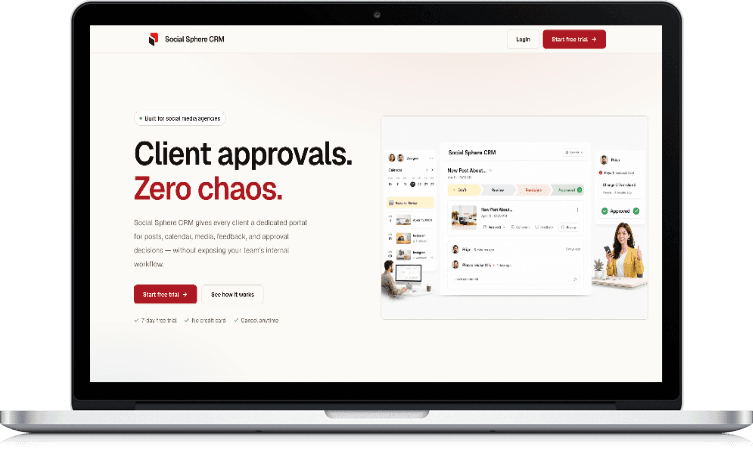
Social Sphere CRM: client approvals without the chaos

Client portals
A dedicated portal for each client
Approvals
Approve, reject or request changes
Audit trail
Who approved what, and when
Calendars
Content plans with live status
See our products
Social Sphere CRM, a client-approval platform built by Zero One Creation, on a laptop

Guide

Custom CRM development: a practical guide for business owners

What is a custom CRM?

A CRM (customer relationship management system) keeps track of leads, customers, conversations and deals in one place. A custom CRM is built specifically for your business, around your own sales stages, fields, approvals and reports, instead of adapting a general-purpose product.

Because it is built for you, a custom CRM can include exactly the screens each role needs, connect to the tools you already use, and leave out the features you would never touch. You own the software and the data.

Custom CRM or off-the-shelf: how to decide

An off-the-shelf CRM is a good choice when your sales process is standard and the product fits it with light configuration. It is fast to start and comes with a large ecosystem of add-ons.

A custom CRM makes sense when your process is a competitive advantage, when you need deep integration with other systems such as ERP or accounting, when per-user licences are becoming expensive as the team grows, or when your team keeps working around the tool instead of in it.

Features every business CRM needs

At its core, a CRM needs contact and company records, a pipeline with clear stages, tasks and reminders, an activity history for every lead, and reports on sources, conversion and team performance.

Beyond that, the right features depend on how you sell: quotations and approvals for B2B, site-visit scheduling for real estate, admission follow-ups for education, or client portals for agencies. Building only what you need keeps the system simple enough for everyone to use.

WhatsApp, email and website integration

Many businesses in India receive most of their enquiries on WhatsApp. Integrating the WhatsApp Business API lets the CRM capture those conversations, send approved templates and keep messages linked to the right lead.

Website and landing page forms should send leads straight into the CRM with their source, so you can see which channels bring real business. Email and calendar sync keep meetings and conversations on the lead's timeline.

Moving your data into a new CRM

Data migration is where many CRM projects stumble. Existing spreadsheets and old systems usually contain duplicates, inconsistent formats and missing fields, so the data needs to be cleaned and mapped before it is moved.

A safe migration moves data in stages, checks counts and samples after each step, and keeps the old system available until the team has confirmed everything is correct.

Security and access control

A CRM holds sensitive information about customers and deals. Role-based access control ensures each person sees only what their role needs, and audit logs record who viewed or changed what.

Hosting in your own cloud account, regular backups, encrypted connections and two-factor login for administrators are basic protections every business CRM should have.

When a CRM should grow into an ERP

A CRM manages customers and sales. When orders, inventory, production, purchasing and accounting also need to be connected, a business is often moving towards an ERP.

A custom CRM can be designed so that it connects to an ERP later, or grows into one module by module, without throwing away the work already done.

What affects the cost of a custom CRM

CRM development costs vary with the number of user roles and workflows, the integrations involved (WhatsApp, email, accounting, ERP or payment gateways), how much data needs to be migrated, reporting and automation needs, mobile access, hosting and security requirements, timeline and ongoing support.

Because these differ so much between businesses, we don't publish fixed prices or packages. After a scoping call, we send a written proposal with the scope, deliverables and a customised quotation.

Before you talk to us

Frequently asked questions

What is custom CRM development?

Custom CRM development means designing and building CRM software specifically for your business, around your sales process, data and integrations, rather than configuring a general-purpose CRM product.

Is a custom CRM better than Zoho or Salesforce?

It depends on your process. Off-the-shelf CRMs suit standard processes and are quick to start. A custom CRM is better when your process is distinctive, when you need deep integrations, or when per-user licences become expensive. We'll recommend what fits on a strategy call.

Can you integrate the CRM with WhatsApp?

Yes. We integrate with the WhatsApp Business API so conversations and leads are captured in the CRM, approved message templates can be sent, and messages stay linked to the right contact.

Can you migrate our data from Excel or another CRM?

Yes. We clean, de-duplicate and map your existing data, migrate it in stages with checks, and keep the old system available until your team confirms the new CRM is correct.

Will the CRM work on mobile phones?

Yes. We build CRMs that work well in a mobile browser for field and sales teams, and can add a dedicated mobile app if your process needs offline access or device features.

Can the CRM connect to our accounting or ERP software?

Yes, through the systems' APIs where available. Orders, invoices, customers and payments can be synchronised so data isn't entered twice.

Do we own the CRM software and data?

Yes. The source code, database and hosting accounts are yours. There is no per-user licence fee to us for using your own CRM.

How secure is a custom CRM?

We build role-based access control, audit logs, encrypted connections and regular backups into every CRM, and host it in your own cloud account where possible.

Can you add features to our existing CRM?

Yes. We can audit an existing custom CRM, fix problems, and add features, integrations or reports alongside your team.

Do you build industry-specific CRMs?

Yes. We design the CRM around how your industry sells, for example admissions for education, site visits for real estate, dealer quotations for manufacturing, or client approvals for agencies.

How long does it take to build a custom CRM?

It depends on the scope: roles, workflows, integrations, data migration and reports. We usually deliver the core pipeline first and agree the full timeline in the written proposal.

Do you provide training and support after launch?

Yes. We train your team on their daily workflows and offer ongoing support for fixes, updates and new features.

Are you a Zoho or Salesforce partner?

No. We are an independent development company. We build custom CRMs and also implement and customise Zoho and Odoo for clients who choose those platforms.

How much does custom CRM development cost in India?

It depends on the scope: user roles, workflows, integrations, data migration, reports and support needs. We do not publish fixed prices; share your requirements and we will send a customised quotation after a scoping call.

Contact us

Tell us how you sell today. We'll show you the CRM it needs.

Share a few details about your team and process. An engineer reviews every enquiry and gets back to you to set up a scoping call.

We use your details only to reply to this enquiry. See our privacy policy.