Gourav Dhiman
A web application rarely fails because it suddenly has "too many users."
It usually fails because one part of the system reaches its limit first.
The database starts spending too long on a handful of expensive queries. One application server runs out of memory. Image delivery consumes bandwidth that should be serving API requests. A background task blocks the request that triggered it. A traffic spike overwhelms a fixed number of instances. Or the architecture technically handles the load, but cloud spending rises much faster than customer growth.
That is what scaling actually means.
The goal is not to build the most distributed architecture you can afford. It is to let the application handle more useful work while maintaining acceptable performance, reliability and cost.
Microsoft's cloud architecture guidance describes performance efficiency as the ability of a workload to adapt to changing demand, scaling up when load grows and scaling back when demand falls. It also recommends identifying bottlenecks rather than assuming that simply adding more servers will solve every performance problem. Microsoft Learn
For most growing applications, the best scaling strategy is evolutionary.
Start simple. Measure real behaviour. Remove obvious bottlenecks. Make the application easier to scale horizontally. Add caching, queues, replicas and partitioning only when the workload justifies them.
That approach tends to produce a system that is both easier to operate and less expensive than an architecture designed around hypothetical future traffic.
Scaling starts with knowing what is actually under pressure
Suppose your application grows from 1,000 users to 100,000.
That number alone does not tell you how much infrastructure you need.
One hundred thousand people who log in once per month create a very different workload from 100,000 people refreshing a live dashboard every few seconds.
Before changing architecture, measure what the application is doing.
Useful signals include:
request volume, requests per second during peak periods, response latency, error rates, CPU and memory utilization, database query duration, database connections, queue depth, cache hit rate, storage growth and network transfer.
Microsoft recommends establishing performance baselines around indicators such as incoming request volume, response time, queued requests and HTTP errors before making capacity decisions. Microsoft Learn
You also need to understand user journeys.
An application can look healthy overall while one commercially important operation is deteriorating.
For example:
Homepage requests may complete in 150 ms.
Account dashboards may complete in 300 ms.
Generating a monthly report may take 14 seconds.
Checkout may intermittently time out.
An average response-time graph can hide that.
Scaling work should therefore begin with the question:
Which user action is becoming slow or unreliable, and which component is responsible?
Fix inefficient work before adding more infrastructure
One of the most expensive scaling mistakes is using additional servers to compensate for inefficient software.
Imagine one API request performs:
40 database queries, multiple external API calls, a large image transformation and generation of a PDF.
If that endpoint becomes slow, doubling the number of web servers might postpone the problem.
It does not remove it.
Microsoft's scale-out guidance explicitly warns that horizontal scaling is not a solution to every performance problem. If the database is the bottleneck, for example, adding more web servers can simply generate more pressure on the same constrained database. Microsoft Learn
Start with profiling.
Look for:
slow SQL queries, repeated queries, unnecessary API calls, oversized payloads, synchronous work that can happen later, unbounded database queries, missing pagination, excessive serialization and operations whose cost increases sharply with dataset size.
A well-optimized application on modest infrastructure can outperform a poorly designed system running across far more machines.
Vertical scaling is useful, but it eventually reaches a limit
The simplest way to increase capacity is often to give an existing resource more power.
This is vertical scaling.
You might move from:
2 CPU cores to 8, 8 GB of memory to 32 GB, or a smaller database tier to a larger one.
Vertical scaling can be entirely reasonable.
If a young SaaS product is growing and upgrading the database gives you another year of comfortable capacity, that may be a better business decision than introducing distributed database architecture.
The problem is that vertical scaling has limits.
Larger instances become increasingly expensive, there is always a maximum available size, and one very large server still represents a concentration of workload and risk.
Cloud architecture therefore tends to favour horizontal scaling for application compute.
Horizontal scaling means running additional instances rather than making a single instance progressively larger. Microsoft describes this as scaling out and recommends designing applications so instances can be added or removed as demand changes. Microsoft Learn
Make application servers stateless before scaling them horizontally
Horizontal scaling works best when any application server can process any request.
Suppose a user signs in through Server A and the server stores that user's session only in its local memory.
The next request reaches Server B.
Server B knows nothing about the session.
Teams sometimes solve this with sticky sessions, where the load balancer tries to keep sending a user to the same server.
That can work, but it reduces flexibility.
Microsoft's architecture guidance recommends avoiding instance stickiness and keeping application state outside individual instances so that requests can be distributed freely across the available servers. Microsoft Learn
State that must survive between requests can instead live in:
a shared session store, database, distributed cache or another persistent service.
The application instances then become replaceable.
One can disappear.
Another can start.
Requests keep flowing.
That property becomes increasingly important as autoscaling, container orchestration and rolling deployments enter the architecture.
Put a load balancer in front of multiple application instances
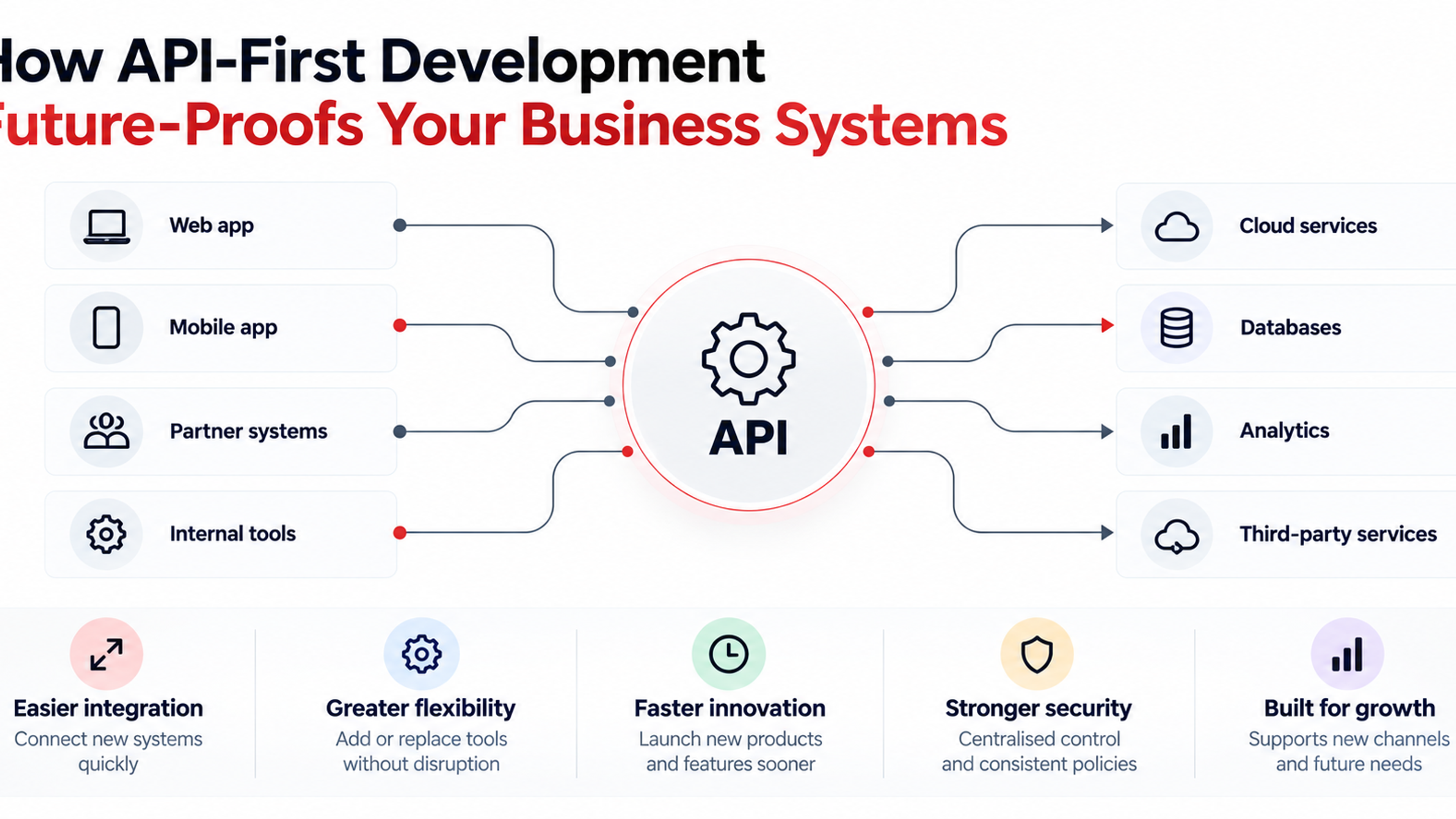
Once multiple application instances exist, incoming requests need to be distributed across them.
That is the role of a load balancer.
AWS describes load balancing as distributing incoming traffic across multiple targets such as instances, containers and IP addresses. It can also perform health checks so requests are directed only to healthy targets. AWS Documentation
A simplified request path becomes:
User → Load Balancer → Application Instance
Instead of:
User → One Application Server
As traffic grows, additional application instances can be added behind the same endpoint.
This improves capacity and can improve resilience.
If one instance becomes unhealthy, traffic can be directed elsewhere.
AWS also recommends integrating load balancing with Auto Scaling so instances can be added or removed as traffic changes. AWS Documentation
Autoscaling should respond to useful workload signals
Autoscaling sounds simple:
CPU rises, add servers.
CPU falls, remove them.
Real applications are more complicated.
CPU may not be the limiting resource.
A service may be constrained by:
memory, request latency, open connections, queue depth, external API limits or database throughput.
Autoscaling rules should reflect what actually predicts saturation.
Microsoft recommends using live usage metrics such as CPU or request queue length for unpredictable workloads and scheduled scaling for predictable patterns. Microsoft Learn
Kubernetes' Horizontal Pod Autoscaler provides a common example. It can adjust the number of workload replicas based on CPU, memory or custom metrics rather than requiring operators to resize the workload manually. Kubernetes
Autoscaling should also be tested.
New instances need time to start.
If an application takes four minutes to become ready but traffic can double in thirty seconds, the scaling policy may react too late.
The system needs spare capacity or earlier triggers.
Cache work that does not need to be repeated
Many web applications repeatedly calculate or retrieve the same information.
A database receives the same expensive query thousands of times.
A product catalogue changes twice per day but is requested continuously.
A dashboard aggregate is rebuilt every time someone opens the page.
Caching keeps a reusable result in faster storage so future requests can avoid repeating the original work.
AWS calls caching one of the most effective ways to improve application performance and reduce load on primary data sources, particularly for frequently accessed information. AWS Documentation
A common pattern is:
Request → Check Cache → Cache Hit → Return Result
If missing:
Request → Database → Build Result → Store in Cache → Return Result
Caching can occur at several levels:
browser, CDN, application process, distributed cache and database-oriented cache.
But cache design requires discipline.
You need to decide:
how long data remains valid, what invalidates it, how stale data is handled and what happens when the cache is unavailable.
Do not treat the cache as your durable source of truth.
AWS specifically warns against relying on cached data as though it were permanent storage and recommends considering data consistency and cache effectiveness. AWS Documentation
Use a CDN to move static delivery away from your origin
Images, JavaScript, CSS, downloads and other static resources do not always need to travel from your application server to every user.
A content delivery network, or CDN, caches appropriate content closer to users.
Cloudflare describes CDN caching as storing copies of frequently accessed content in geographically distributed data centres, reducing origin server load while improving delivery performance. Cloudflare Docs
This can produce two scaling benefits.
First, users may receive static resources from infrastructure geographically closer to them.
Second, your application servers receive fewer requests.
For applications with large amounts of media, move uploads and generated assets into object storage rather than serving them from the local filesystem of an application instance.
This also supports horizontal scaling because individual application servers no longer own user files.
The database often becomes the most important scaling constraint
Web servers are relatively straightforward to duplicate.
Databases are harder because they hold state that needs to remain correct.
Before considering advanced database architecture, make sure basic database performance is healthy.
Index queries that matter
An index allows a database to locate relevant rows without scanning the entire table.
PostgreSQL's current documentation describes indexes as a common way to improve database performance because they can retrieve targeted rows much faster, while also noting that indexes have their own overhead and should be used deliberately. PostgreSQL
Do not add indexes randomly.
Measure the actual workload.
PostgreSQL recommends examining real query plans with EXPLAIN and using workload statistics to understand whether indexes are being used effectively. PostgreSQL
Avoid unbounded queries
Do not request every record when a user needs the newest 20.
Use:
pagination, filtering, sensible limits and selective fields.
As datasets grow, queries that seemed harmless with 5,000 rows may become expensive with 50 million.
Watch connection counts
Each application instance may create database connections.
If application servers scale from 5 to 100 while every instance opens many connections, the database can become overloaded before request volume itself becomes the problem.
Connection pooling can help control this.
Separate reads when necessary
Many growing applications perform far more reads than writes.
Read replicas can allow certain queries to be served by replicated database instances while the primary remains responsible for writes.
This adds complexity because replicas may briefly lag behind the primary.
The application must therefore understand which reads require immediate consistency.
An account balance immediately after a transaction has different consistency requirements from yesterday's analytics dashboard.
Do not jump to database sharding too early
Sharding divides data across multiple database units.
It is powerful.
It is also one of the easier ways to make a system significantly harder to develop and operate.
Before sharding, verify that simpler measures are exhausted:
query optimization, indexing, appropriate hardware, caching, read replicas, connection management, archiving and removal of expensive reporting workloads from the transactional database.
Partitioning becomes valuable when a single database architecture is genuinely limiting the system.
Microsoft's scaling guidance describes partitioning as dividing data or processing into smaller units to distribute load and reduce contention, but it treats it as part of a deliberate scaling strategy rather than a default starting point. Microsoft Learn
The same principle applies to most scaling technology:
do not pay the complexity cost before you receive the benefit.
Move slow work out of the request cycle
A web request should ideally complete only the work necessary to respond to the user.
Suppose uploading a video requires:
virus scanning, transcoding, thumbnail creation, AI analysis and notifications.
If the user waits while every step completes, the request is fragile and slow.
Instead:
User uploads file → application stores it → job enters queue → user gets confirmation → background workers process the file.
Queues decouple work from the original request.
They also provide another useful scaling boundary.
If 100,000 jobs suddenly arrive, they can wait in a controlled queue rather than forcing the application to process all of them simultaneously.
Workers can then scale independently.
Microsoft lists background jobs and asynchronous messaging among common cloud patterns for scalable applications. Microsoft Learn
Typical background tasks include:
emails, exports, PDF generation, image processing, billing jobs, search indexing, webhooks, data imports and analytics calculations.
Design for spikes, not only average traffic
Average usage can be misleading.
An e-commerce platform may receive normal traffic all week and suddenly see a major promotion drive ten times the request rate.
A ticketing platform may experience most traffic during a few minutes.
A B2B payroll application may become busy at predictable times each month.
Ask:
What is the normal load?
What is the expected peak?
How quickly can the peak arrive?
How long can it last?
Which workflow dominates during the peak?
A system that can process 1 million requests spread across 24 hours may still fail when 200,000 arrive in five minutes.
Autoscaling, caching and queues all help, but load testing is how you discover whether they actually work together.
Load test before users perform the experiment for you
Load testing simulates realistic demand so you can observe how the application behaves before a production event exposes the limit.
Do not test only whether the server survives.
Track:
latency percentiles, error rates, database query time, CPU, memory, connection pools, queue growth, cache behaviour and dependency performance.
The most useful result from a load test is often the first bottleneck.
Suppose:
application CPU stays at 40%, database CPU reaches 95%, request latency spikes and connection waits appear.
You have learned that scaling application instances is unlikely to help.
Fix the database constraint and run the test again.
That iterative process produces a capacity model.
Microsoft's Well-Architected guidance recommends load testing early and monitoring solution health as part of performance-efficient design. Microsoft Learn
Observability becomes more important as architecture becomes distributed
A single-server application can sometimes be debugged by opening a log file.
A distributed system may involve:
CDN, load balancer, five application instances, cache, queue, workers, primary database, replicas and several third-party APIs.
When a request becomes slow, you need to know where the time went.
That requires observability.
Useful capabilities include:
centralized logs, metrics, distributed tracing, error tracking and alerts tied to business-critical workflows.
Measure what users experience, not only infrastructure health.
A server with healthy CPU does not mean checkout works.
Good monitoring should answer:
Are users succeeding?
How long does the important workflow take?
Where is time being spent?
Which dependency is failing?
Has a deployment changed behaviour?
Reliability has to scale with traffic too
A system handling 50 customers may tolerate a short manual recovery.
A system handling 500,000 customers cannot rely on someone noticing that a server failed and restarting it.
As an application grows, introduce:
health checks, redundancy, automated recovery, backups, restore testing, multiple availability zones where justified, deployment rollback and graceful failure behaviour.
Load balancing itself contributes to resilience because unhealthy targets can be removed from traffic. AWS notes that load balancers can monitor target health and route requests only to healthy instances. AWS Documentation
Scaling therefore is not just:
Can the system process more requests?
It is also:
Can it continue operating when individual components fail?
Protect downstream systems from your own scale
Your application may scale successfully while another service does not.
Imagine increasing web servers from 10 to 100.
All of them call the same:
payment API, email provider, CRM integration or internal reporting service.
Now your scaling event becomes their traffic spike.
Use:
rate limits, queues, connection limits, retries with backoff and circuit breakers where appropriate.
Be particularly careful with retries.
If a dependency becomes overloaded, 50 application instances repeatedly retrying immediately can make the outage worse.
Systems should retry deliberately, not aggressively.
Microservices are not a prerequisite for scale
It is possible to build a highly scalable application without splitting every function into its own service.
A well-designed modular monolith can support substantial traffic.
It has advantages:
simpler deployments, easier local development, fewer network calls, simpler transactions and lower operational overhead.
Microservices become valuable when parts of the system genuinely need different:
scaling characteristics, deployment cycles, team ownership, reliability boundaries or technology choices.
For example, image processing may need to scale independently from account management.
That does not mean account management must immediately become five services.
Microsoft recommends decomposing workloads according to their different scaling requirements rather than treating every component identically. Microsoft Learn
Scale the architecture where pressure exists.
Do not distribute the application because distributed architecture looks more advanced.
Separate components when there is a concrete reason
A useful progression might look like this:
Early stage
One application.
One relational database.
Managed hosting.
Object storage.
Basic monitoring.
Growing stage
Multiple stateless app instances.
Load balancer.
CDN.
Redis or equivalent cache.
Background queue and workers.
Improved database indexes.
Centralized observability.
Higher-scale stage
Read replicas.
Specialized search system.
Independent scaling for heavy workloads.
Data partitioning where justified.
Multiple regional or availability strategies if the business requires them.
The transition between these stages should be triggered by evidence.
Not by user-count milestones copied from another company.
Scaling and cost have to be planned together
A system can be technically scalable and financially unsustainable.
Imagine revenue doubles while infrastructure cost increases fivefold.
That architecture has a scaling problem even if performance is excellent.
Monitor unit economics such as:
infrastructure cost per active user, cost per transaction, database cost per customer, bandwidth per user and background-processing cost per job.
Caching and CDN usage may reduce origin load.
Autoscaling may remove unused compute during quiet periods.
But autoscaling can also create unexpected bills if there is no sensible maximum or if inefficient code causes the platform to continuously add resources.
Performance efficiency is partly about matching capacity to demand rather than permanently provisioning for the largest imaginable peak. Microsoft and AWS both frame scaling around using resources efficiently as workload demand changes. Microsoft Learn
Security must survive horizontal growth
Scaling introduces more infrastructure.
More servers can mean:
more identities, secrets, network paths, logs, deployment targets and potential misconfiguration.
Automate security wherever practical.
Use:
managed identities or role-based service credentials, secrets management, infrastructure as code, patching processes, encryption, rate limiting and web application firewall controls where appropriate.
Do not create a scaling architecture that depends on someone manually configuring every new server.
If additional instances are created automatically, security configuration must also be automatic.
Have a capacity plan for major launches
Before a campaign, product launch, migration or major customer onboarding, estimate expected load.
Then ask:
Can the CDN absorb static traffic?
How many application instances are required?
Can the autoscaler react quickly enough?
Can the database handle the expected connections and queries?
Can the queue absorb bursts?
Can workers catch up?
Are third-party APIs rate-limited?
What happens if traffic exceeds the forecast?
Can non-essential functionality degrade gracefully?
Planning these questions before launch is far easier than debugging them while thousands of users are waiting.
Know when your current architecture is approaching its limit
Scaling should be proactive, but not speculative.
Useful warning signals include:
response times rising as traffic grows, database CPU consistently approaching saturation, increasing lock or connection waits, background queues taking longer to clear, frequent memory pressure, rapidly growing cloud spend and regular incidents during normal traffic spikes.
The pattern matters more than a single event.
A temporary CPU spike may be harmless.
A month-long trend showing the database approaching saturation during every business day is a capacity signal.
At that point, you can model the likely failure threshold and plan the next architectural change before reaching it.
A practical order for scaling a growing application
There is no universal architecture, but the following sequence is often sensible:
- Measure first. Establish application and database baselines.
- Optimize obvious inefficiencies. Fix slow code and expensive queries.
- Index the database appropriately. Use real query plans rather than guesses.
- Move static content to object storage and a CDN.
- Make application instances stateless.
- Add a load balancer and horizontal application capacity.
- Introduce autoscaling based on useful workload metrics.
- Cache frequently accessed data where consistency permits.
- Move slow work into queues and background workers.
- Scale database reads or partition workloads only when evidence requires it.
- Improve observability and reliability as architectural complexity grows.
- Continuously load test and reassess cost per unit of useful work.
The sequence matters because each step should solve an observed constraint.
Common web application scaling mistakes
Scaling before measuring
You can spend weeks optimizing a service that contributes almost nothing to actual latency.
Profile first.
Treating CPU as the only metric
Applications often fail because of:
database connections, memory pressure, locks, queue growth or downstream limits.
Adding application servers when the database is constrained
More application instances can make database overload worse.
Caching everything
Frequently changing or strongly consistent data may be poor cache candidates.
Splitting into microservices too early
You gain independent deployment boundaries but inherit network failures, distributed tracing, service discovery and additional operational work.
Ignoring background workloads
A report-generation queue growing for six hours is a scalability failure even if the public website remains responsive.
Relying on one large database forever
Vertical scaling can be useful, but long-term planning should understand the limits of the selected platform.
Ignoring cost while optimizing performance
Performance bought with unlimited infrastructure is not efficient scaling.
Scale the bottleneck, not the architecture diagram
The best scalable architecture is rarely the one containing the largest number of boxes.
It is the one that can adapt as demand changes without becoming unnecessarily difficult or expensive to operate.
A growing web application may begin with:
one application, one database and managed hosting.
Then real usage reveals what needs to change.
Static content moves to a CDN.
The application becomes stateless.
Traffic spreads across multiple instances.
Frequently read data enters a cache.
Slow work moves into queues.
The database receives better indexes.
Read replicas appear when read traffic justifies them.
Specialized workloads separate when independent scaling becomes valuable.
Every change responds to a measurable pressure.
That is much safer than trying to predict the architecture required for ten million users before the first thousand have arrived.
Scaling therefore is not primarily about preparing for a giant user number.
It is about building an application that makes its limits visible and gives your team practical ways to remove them one by one.
Measure.
Find the current bottleneck.
Choose the smallest architectural change that addresses it.
Test again.
Then repeat as the business grows.
That process is what turns a web application from something that merely survives additional users into a system that can grow with them.
Frequently Asked Questions
Web application scalability is the ability of a system to handle changing levels of demand while maintaining acceptable performance, reliability and cost. It can involve adding compute instances, optimizing databases, caching, load balancing, asynchronous processing and partitioning workloads.
Vertical scaling increases the resources of an existing machine, such as CPU or memory. Horizontal scaling adds additional instances. Cloud architectures often favour horizontal scaling for application compute because resources can be added and removed as demand changes.
Caching is valuable when the application repeatedly reads or calculates information that can be safely reused for some period. It can reduce database load and response latency, but cache expiration and consistency need to be designed carefully.
Look for sustained query latency, high resource use, lock contention, connection exhaustion and poor performance during load tests. First optimize queries and indexes before assuming the database architecture must be replaced. PostgreSQL recommends evaluating index usage against actual queries and workloads.
No. A modular monolithic application can scale horizontally and use caches, queues, CDNs and database replicas. Microservices are more useful when components genuinely need different scaling, deployment or ownership boundaries.
A CDN is particularly useful for static and cacheable content such as images, scripts, stylesheets, downloads and some webpages. Caching content near users can improve delivery speed while reducing traffic to the origin application.
A load balancer becomes useful when traffic needs to be distributed across multiple application instances or when you need health-based routing and improved availability. AWS describes load balancers as distributing requests across targets and routing traffic only to healthy targets.
No. If the database, external API, storage layer or another shared component is the bottleneck, adding application servers may provide little benefit and can increase pressure on the constrained resource.