

 Gourav Dhiman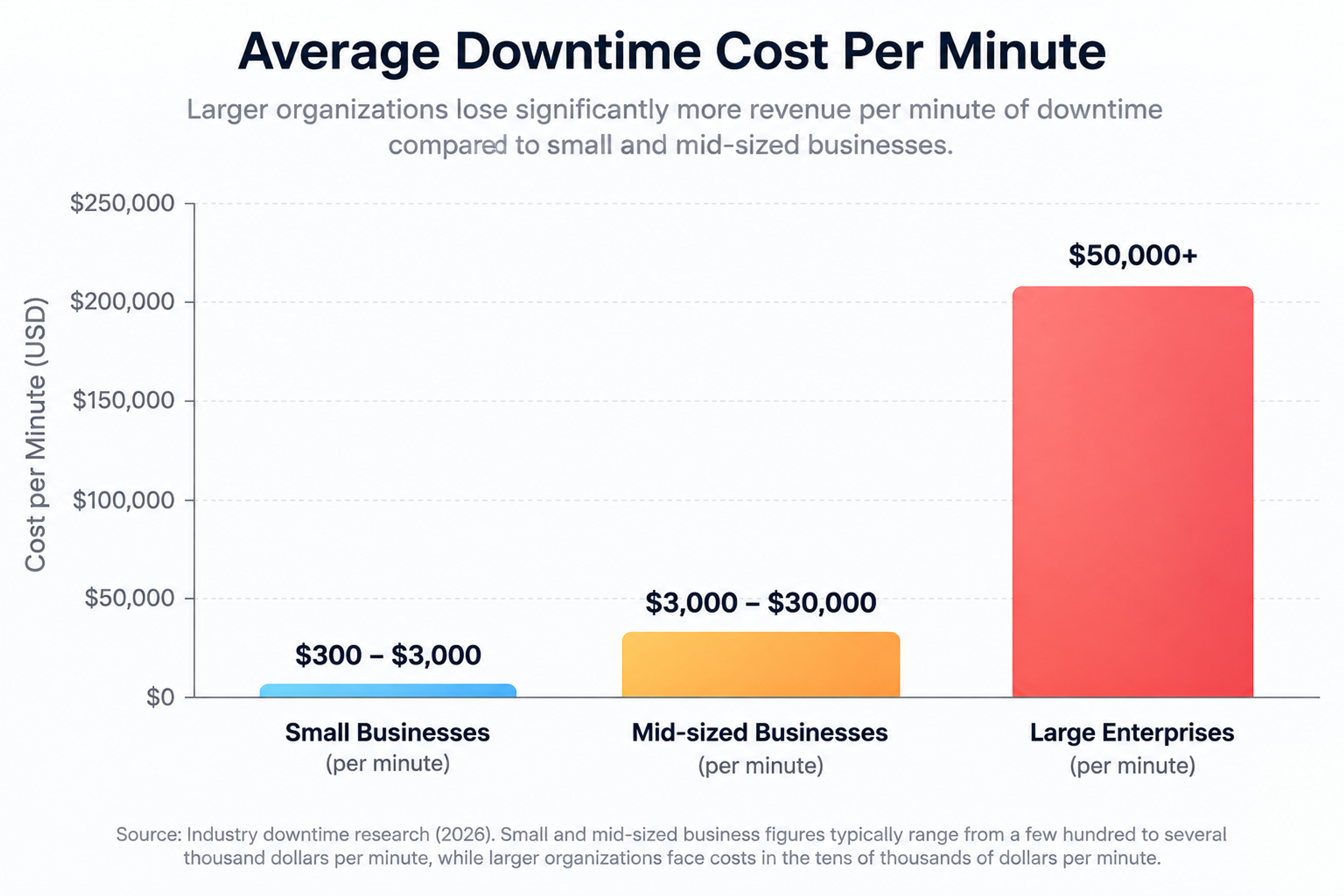
A traffic spike doesn't usually announce itself. One minute your dashboards look normal, and the next your checkout page is timing out because a marketing email landed better than anyone expected, or a product got mentioned somewhere with a lot of eyeballs. If your infrastructure hasn't been built to absorb that kind of surge, the difference between "great problem to have" and "worst day of the quarter" comes down to a handful of decisions you made weeks or months earlier.
This guide walks through what actually matters when preparing for a spike: how to size your capacity, where the real bottlenecks hide, and which fixes give you the most protection for the least engineering effort. It's written for the person who has to answer for uptime, not for a general audience skimming for buzzwords.
Why Traffic Spikes Break Systems That "Should" Handle Them
Most systems don't fail because they lack raw capacity. They fail because load isn't distributed evenly, because one slow component becomes a chokepoint for everything behind it, or because scaling reacts too late to matter. A server can have plenty of headroom on paper and still fall over in practice if a single database query starts taking three seconds instead of thirty milliseconds under concurrent load.
Traffic surges generally come from a few recognizable sources: seasonal shopping events, a scheduled launch or campaign, sudden media or social attention, and occasionally a spike that isn't organic at all but the early signature of a DDoS attempt. Each of these has a different shape. A flash sale ramps and falls in hours. A viral moment can spike within minutes and stay elevated for days. Knowing which kind you're likely to face changes how you prepare for it.
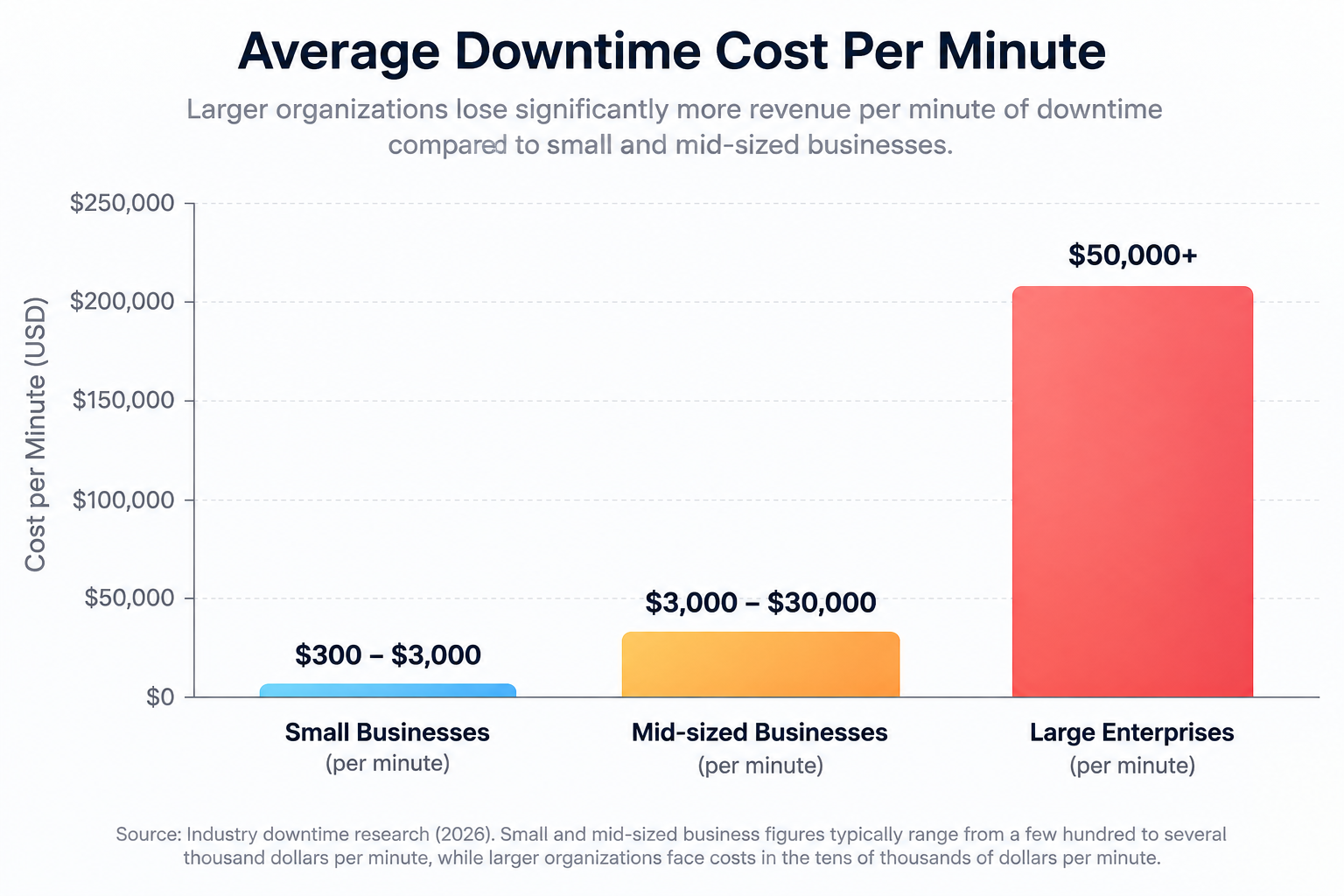
The financial stakes of getting this wrong keep climbing. Industry downtime research from 2026 puts the average cost of an outage well into the tens of thousands of dollars per minute for larger organizations, with small and mid-sized businesses typically losing anywhere from a few hundred to several thousand dollars per minute depending on how digital-dependent their revenue is. Those averages, though, understate what happens during a spike specifically: a 30-minute outage during a launch or campaign can cost far more than the same outage on an ordinary Tuesday, because the traffic you're failing to serve is traffic you spent money to attract.

Image Type: Simple bar comparison graphic
Image Brief: Show average downtime cost per minute for small businesses versus mid-size and large enterprises, sourced from the figures cited above
Purpose: Gives readers a quick visual sense of scale before they read the technical sections
Suggested Alt Text: Comparison chart of downtime cost per minute across business sizes
Suggested File Name: downtime-cost-comparison-chart.webp
Start With Your Own Numbers, Not Someone Else's Best Practices
Before touching any configuration, you need a baseline. Pull your historical traffic data and look for two things: your normal peak-to-trough ratio on an average week, and the multiplier during your biggest known events from the past year or two. If your average Tuesday afternoon sees 500 requests per second and your last big sale pushed that to 4,000, you now have a real number to design around instead of a guess.
This matters because "we need more servers" is not a plan. "We want to comfortably handle 5x last November's peak, with headroom for an unplanned event on top of that" is a plan, and it's the kind of target that lets you size auto-scaling groups, database read capacity, and CDN configuration with intent rather than instinct.
While you're at it, separate infrastructure metrics from business metrics. CPU, memory, disk I/O, and network latency tell you what your servers are doing. Cart abandonment rates, form completion rates, and support ticket volume during past campaigns tell you what your users experienced. The two don't always move together, and a system that looks fine on a server dashboard can still be quietly losing customers to a slow checkout flow.
Scale Before the Pressure Builds, Not After
Auto-scaling is standard advice at this point, but the detail that actually determines whether it works is the threshold you scale on. A common mistake is setting scaling triggers around 90% CPU utilization on the theory that you're "using resources efficiently." In practice, that leaves almost no runway between the trigger firing and users feeling the slowdown, especially since new instances take time to boot, register with a load balancer, and warm up. A more reliable target is closer to 60% utilization, which gives your infrastructure room to add capacity before anyone notices degradation.
For events you know about in advance, don't rely on reactive scaling at all. Pre-warm your infrastructure 30 to 60 minutes before the expected surge so that capacity is already in place when the traffic arrives, rather than racing to catch up after it starts. This is especially important for stateful services or anything sitting behind a cold cache, where the first wave of requests is the most expensive to serve.
Load balancing does the other half of this work. Even a perfectly scaled fleet fails if requests land unevenly, hammering one instance while others sit idle. A load balancer that distributes connections intelligently, rather than through simple round robin, keeps individual nodes from becoming accidental bottlenecks during exactly the moment you can least afford one.
Cache Aggressively, at Every Layer
Caching is the single highest-leverage thing you can do to survive a spike, because every request served from cache is a request your origin servers never have to process. The mistake most teams make is treating caching as a CDN-only concern. It should exist at three layers: the CDN or edge layer for static assets and cacheable pages, the application layer for computed results that don't need to be recalculated on every request, and the database layer for query results that get hit repeatedly.
For content that changes but doesn't need to be instantly fresh, stale-while-revalidate is worth implementing if you haven't already. It serves the cached version immediately while quietly refreshing it in the background, so users never wait on a cache miss and your origin never gets hit with a thundering herd of simultaneous refresh requests the moment a cache entry expires.

Image Type: Layered architecture diagram
Image Brief: Show a request flowing through CDN cache, application cache, and database cache layers, with a note on what percentage of traffic ideally gets absorbed at each layer before reaching the origin database
Purpose: Makes the abstract idea of "multi-layer caching" concrete and shows readers where to focus effort first
Suggested Alt Text: Diagram of multi-layer caching architecture from CDN to database
Suggested File Name: multi-layer-caching-architecture-diagram.webp
Find Your Database Before It Finds You
During a spike, the database is almost always where things go wrong first, because it's the hardest layer to scale horizontally and the easiest to overload with connections. A few concrete steps make a real difference here. Connection pooling prevents your application from opening a fresh database connection for every request, which is one of the fastest ways to exhaust a database's connection limit under load. Read replicas let you offload the read-heavy queries that dominate most traffic spikes, keeping the primary database free for writes. Indexing your most frequently queried fields, and actually checking your slow query logs before an event rather than during one, catches the queries that look fine at low traffic but become the bottleneck under concurrency.
It's also worth doing routine cleanup before a known high-traffic period: stale sessions, unnecessary logging tables, unused indexes that slow down writes, and old records that bloat your working set all quietly tax a database that's about to be under pressure. This is unglamorous work, but it's often more effective than buying a bigger database instance.
Protect the System With Rate Limiting
Not every request during a spike deserves equal priority, and rate limiting is how you enforce that without turning the whole site off. Applying limits at the edge, before requests even reach your application servers, stops abusive or automated traffic from competing with real users for capacity. A token bucket approach is a good default here because it allows for short bursts of legitimate activity while still capping sustained load, which fits how human traffic actually behaves.
Rate limiting also matters for a reason that's easy to overlook: a genuine traffic spike and the early stage of a DDoS attempt can look identical for the first few minutes. Having limits and monitoring already in place means you're not trying to tell the difference for the first time while your site is already struggling.
Decouple What You Can
Not every part of a request needs to happen synchronously while a user waits. Order confirmation emails, image processing, analytics events, and other non-blocking work can be pushed onto a message queue and processed asynchronously, which keeps your web tier responsive even when background work is backed up. This pattern also isolates failures: if one downstream service slows down or fails during a spike, it doesn't take your entire request pipeline down with it, because the queue absorbs the backlog instead of the backlog cascading into timeouts everywhere else.
This is a bigger architectural shift than the other items on this list, so it's not something to attempt for the first time the week before a launch. But if your architecture already has natural seams between "things the user needs a response to right now" and "things that can happen a few seconds later," decoupling them is one of the more durable investments you can make.
Don't Ignore the Front End
It's tempting to think of traffic spike preparation as purely a backend and infrastructure problem, but a bloated front end can undermine all of it. Large uncompressed images, excessive third-party scripts for tags and pixels and chat widgets, and JavaScript that blocks rendering all make every single visit more expensive in terms of server resources and slower for the user regardless of how well your backend scales. Compressing images into modern formats, minifying CSS and JavaScript, lazy-loading below-the-fold content, and paying attention to Core Web Vitals metrics like Largest Contentful Paint and Cumulative Layout Shift aren't just SEO checkboxes. They directly reduce how much load each visitor generates, which matters a lot more when you have ten times the usual number of visitors.
Test Before the Real Thing Tests You
Load testing is the step teams skip most often, usually because it takes real time to do properly and there's always something more urgent. But there's no substitute for simulating your expected peak traffic against a staging or production-like environment before the actual event arrives. A good load test doesn't just throw raw requests at an endpoint; it tries to approximate real user behavior, including the mix of pages people actually visit, the concurrency patterns of a real checkout flow, and the kind of traffic ramp you expect rather than an instant flat spike.
Run these tests early enough that you have time to act on what you find. Discovering your database connection pool tops out at 3x normal traffic is useful information three weeks before a launch. It's a crisis the night before one.

Image Type: Simple process flow graphic
Image Brief: Show a load testing cycle: define expected peak, simulate realistic traffic patterns, identify the first bottleneck, fix it, retest
Purpose: Gives readers a repeatable process rather than a one-time task, which is how load testing should actually be treated
Suggested Alt Text: Load testing cycle for traffic spike preparation
Suggested File Name: load-testing-cycle-diagram.webp
Watch It Happen in Real Time
Once the spike is underway, monitoring is what tells you whether your preparation is working or whether you need to intervene. The metrics worth watching in real time are the ones that predict user-facing pain before it fully arrives: request latency percentiles rather than just averages, error rates broken down by endpoint, database connection pool saturation, and queue depth if you're using one. An average response time of 200 milliseconds can hide a p99 of eight seconds for a meaningful slice of users, and that's the group most likely to abandon and complain.
Set alert thresholds before the event, not during it, and make sure whoever is on call actually knows what a normal spike looks like versus an abnormal one. A team that's calm and has a clear escalation path handles a rough hour far better than a team that's discovering the dashboards for the first time under pressure.
Common Mistakes Worth Avoiding
A few patterns show up repeatedly in post-incident reviews after a spike-related outage. Teams scale compute but forget the database has its own separate ceiling. Teams cache pages but forget that a cache miss storm at the exact moment of a deploy or cache expiry can be as damaging as no caching at all. Teams load test their happy path but never test what happens when a downstream API they depend on slows down under the same pressure. And more than a few teams treat "we survived Black Friday last year" as proof they're ready this year, without accounting for the fact that traffic, product catalogs, and third-party dependencies all change year over year.
After the Spike Ends
The event isn't really over when traffic drops back to normal. The most useful thing you can do in the following days is a clear-eyed review: which layer came closest to its limit, what would have happened if traffic had been 20% higher, and which fixes were duct tape versus genuine capacity improvements. That review is what turns this year's near-miss into next year's non-event.
Frequently Asked Questions
For a planned launch or campaign, start capacity planning and load testing at least two to three weeks out, and pre-warm infrastructure 30 to 60 minutes before the event itself so scaling isn't happening in real time as traffic arrives.
Auto-scaling handles the mechanics of adding resources, but it can't fix an undersized database, an unindexed query, or a rate limit that's too aggressive. Treat it as one layer of protection, not the whole strategy.
Early on, they can look similar. Rate limiting, geographic and behavioral traffic analysis, and having a CDN or edge provider with basic DDoS mitigation in place give you protection either way while the picture becomes clearer.
Caching, almost always. A well-configured CDN and application cache can absorb the majority of a traffic surge with no changes to your origin infrastructure at all, and it's usually the fastest thing to implement properly in a short window.